
Last Updated: May 2026 | Author: Zee
For many low-income families, the federal government’s definition of “poverty” is heartbreakingly strict. You might be struggling to pay rent and buy groceries, yet if you earn just $100 over the limit, your application for a federal laptop subsidy gets rejected.
This is where the Non-Profit Sector steps in.
Unlike the government, private charities and non-profit organizations (NGOs) operate with compassion, not just cold calculations. They understand that a single mother working two jobs might not qualify for Medicaid but still desperately needs a computer for her child’s homework.
This comprehensive directory lists the most reliable non-profit organizations in the United States that provide free laptops, computers, and digital training in 2026. We have verified their application processes to save you time.
Did You Check the Government First? Before you spend hours writing hardship letters to charities, double-check your federal eligibility. If you receive SNAP (Food Stamps) or Medicaid, you likely qualify for an immediate device subsidy without a waitlist. Read our Master Guide to Free Government Laptops first.

Behind every free laptop is a team of dedicated volunteers working to bridge the digital divide.
Phase 1: The National Heavyweights (Organizations That Ship Nationwide)
These are the “Big Three” non-profits with the largest inventory and the widest reach. They typically accept applications from anywhere in the U.S., although competition is fierce.
1. Computers with Causes
This is one of the oldest and most respected charitable programs in the country. Operated by the Giving Center, Computers with Causes focuses on a “Needs Assessment” model rather than a strict income cutoff.
- Who They Help: They prioritize foster children, disabled veterans, and shelters/battered women’s centers. However, individuals with a genuine financial hardship are encouraged to apply.
- The Application Secret: Unlike government forms where you just check boxes, this application requires a “story.” In the comments section of their form, do not just say “I need a laptop.” Explain why.
- Bad Example: “I need a computer for free.”
- Winning Example: “I am a single father of two. My oldest son has been diagnosed with dyslexia and needs specific reading software that doesn’t work on his school tablet. A Windows laptop would allow him to…”
- The Process: They review applications manually. If selected, they will perform a background check and reference check. This is rigorous, but it ensures the devices go to those who truly have zero other options.

Unlike government forms, non-profits read your story. A compelling hardship letter can be the key to getting approved.
Note: If you are applying due to a medical condition or disability, standard non-profit applications might not cover expensive adaptive software. Learn how to get specialized funding for assistive technology in our guide: Free Computers for Disabled People.
2. The On It Foundation
Standing for “Opportunities Necessary to Increase Technology,” The On It Foundation has a very specific mission: helping K-12 students in low-income families who qualify for the free/reduced school lunch program.
- The “Gap” Strategy: If you live in a state where the federal government’s program has a waitlist, The On It Foundation is your best backup.
- Eligibility Rule: You must have a child in grades K-12 attending a U.S. public school, and that child must receive free or reduced lunch.
- The “Jump Start” Trick: If they do not have a computer available immediately, they often provide “Jump Start” training programs. Take these courses. Demonstrating that you are actively trying to improve your digital skills often moves your application to the top of the hardware waitlist.
3. Digitunity (Formerly AFTRR)
This is not a single charity, but a massive network of non-profits. Digitunity (which evolved from the Alliance for Technology Refurbishing and Reuse) acts as a central hub for hundreds of local technology refurbishers across America.
- Why It Works: Many small, local charities (that have plenty of laptops!) do not have good SEO and don’t show up in Google. Digitunity helps you find them.
- How to Use It: Go to their “Find a Refurbisher” map. Enter your Zip Code. Look for organizations marked as offering “Community Support” or “Low-Cost Equipment.”
- Pro Tip: Do not just email them. Call them. Small local refurbishers are often run by volunteers who might miss emails but are happy to help a neighbor who calls and explains their situation.
Phase 2: Regional Powerhouses (Local Focus, Big Impact)
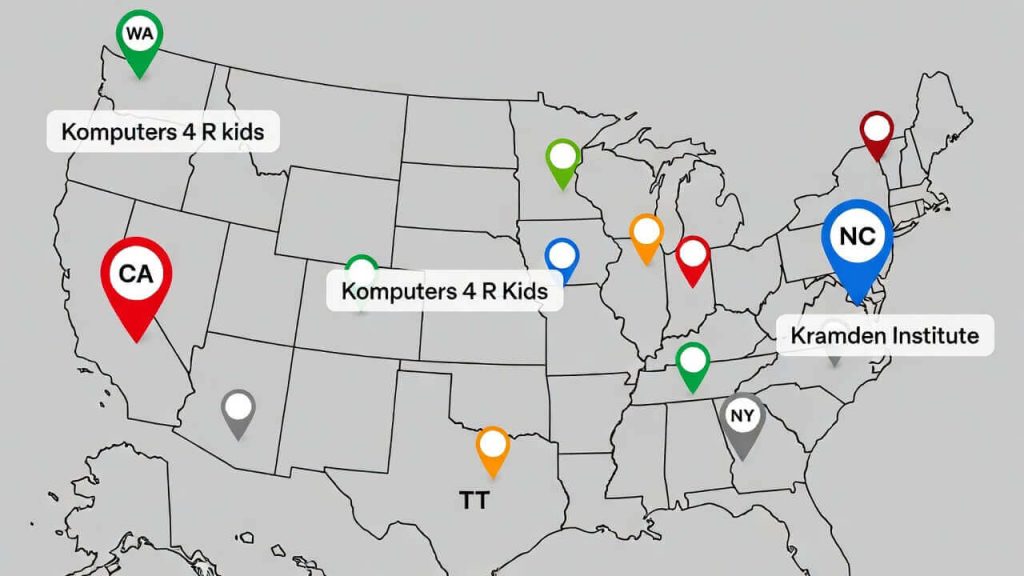
Don’t just look nationally. Regional powerhouses often have shorter waiting lists and serve specific communities more effectively.
While national organizations are great, they are often flooded with thousands of applications daily. Your odds of approval might actually be higher with a “Regional Powerhouse”—large organizations that focus on specific states or cities.
1. Computers for Kids (Pacific Northwest Focus)
Based in Idaho, Computers for Kids (C4K) is a powerhouse for students in the Pacific Northwest. Unlike some charities that only help K-12, C4K extends their support up to college sophomores.
- Who They Help: They specifically serve students in Idaho, Washington, Oregon, and Utah. If you live in these states, this should be your first stop.
- The “Essay” Requirement: C4K wants to see commitment from the student, not just the parent. Part of their application requires the student to write a short essay explaining how the computer will help their education.
- Insider Tip: Make sure your child writes this part! It doesn’t have to be perfect, but it must be sincere.
- The Cost: While the computer is donated, they typically request a small refurbishment fee (often around $30-$40) to cover licensing and parts.
2. Kramden Institute (North Carolina)
The Kramden Institute is famous for their “Geek-A-Thon” events where volunteers refurbish thousands of computers in a single weekend.
- The “Technology for Education” Program: They award computers to K-12 students who do not have a working computer at home.
- The Teacher Referral Hack: This is a crucial secret. Kramden relies heavily on referrals. If you are a parent, do not just apply blindly. Go to your child’s school guidance counselor or principal and ask them to nominate your family. A nomination from a school official is almost a guaranteed approval.
3. InterConnection (Seattle & National Online Store)
InterConnection is a unique hybrid. They are a non-profit, but they also operate a massive online store called ConnectAll.
- The “Low-Cost” Alternative: Sometimes, “Free” has a 6-month waiting list. If you need a laptop now for a job interview, InterConnection sells high-quality refurbished laptops to low-income individuals for as low as $100-$150.
- Why It Matters: While not free, these laptops come with a valid Windows license and a warranty. For many families, paying $100 for a guaranteed working laptop today is better than waiting 8 months for a free one.
Phase 3: The Hardship Letter Masterclass (How to Get Approved)
Here is the brutal truth: Most non-profit applications are rejected not because the applicant isn’t poor enough, but because their application was generic.
Charities are run by humans, not robots. They want to know that their donation will change a life. Writing “I need a laptop because I am broke” is not enough. You need to write a Hardship Letter (or “Personal Statement”) that stands out. Here is the proven 3-part formula used by successful grant applicants.
Part 1: The “Specific” Struggle (The Hook)
Donors hear general sob stories all day. Be specific about the barrier the lack of a computer creates.
- Weak: “I don’t have money for a computer.”
- Strong: “My daughter, Maya, is falling behind in 6th-grade math because her homework requires the ‘iReady’ software, which does not load on my smartphone. Every night, we have to drive to the library, but it closes before I get off work.”
- Why this works: It names the child, names the specific software problem, and shows you are already trying hard.
Part 2: The “Exit Strategy” (The Goal)
Charities want to fund success, not just alleviate suffering. Show them how this laptop will be the tool that gets you out of poverty.
- Weak: “I want to watch movies and check email.”
- Strong: “I am currently enrolled in a Google Data Analytics Certificate program. A reliable laptop will allow me to complete my certification by December and apply for remote entry-level jobs that pay $20/hour, allowing my family to get off food stamps.”
- Why this works: It gives a timeline (December) and a concrete financial goal ($20/hour).
Part 3: The “Technical” Ask (The Closing)
Be humble, but be clear about what you need to succeed.
- Example: “I am not asking for a new MacBook. Any working Windows laptop with a webcam would be a blessing, as it would allow me to attend Zoom interviews without borrowing a friend’s phone.”

Use our proven 3-part formula to write a hardship letter that stands out from thousands of generic applications.
Copy-Paste This Template:
“Dear [Organization Name],
My name is [Your Name] and I am a single parent/veteran/student living in [Your City]. I am writing to humbly request assistance with a refurbished laptop.
Currently, my family is facing a digital barrier. [Insert 1-2 sentences about your specific struggle]. We have been relying on a shared smartphone, but it is insufficient for [specific task].
This computer would not just be for entertainment; it is a tool for our independence. My goal is to use this device to [Insert your Exit Strategy/Goal].
Thank you for your time and for the incredible work you do for our community.
Sincerely, [Your Name]”
Conclusion: Build Your “Portfolio” of Applications
Securing a free laptop in 2026 is not about luck; it is about persistence and strategy.
If you only apply to one program, your chances of success are slim. But if you treat this like a job hunt—building a “portfolio” of applications—your odds skyrocket.
Your Action Plan for Today:
- Start at the Top: Check your federal eligibility first. If you have SNAP or Medicaid, the government route is faster. (See our Government Guide).
- Write Your Story: Draft your “Hardship Letter” using the template in Phase 3. Save it as a text file so you can copy-paste it easily.
- Apply to the “Big Three”: Submit applications to Computers with Causes, The On It Foundation, and Digitunity.
- Go Local: Use Google Maps to find “Computer Recycling Center” or “E-Waste” near you and call them directly.
Final Thought: The digital divide is real, but it is not impassable. There are millions of functional computers sitting in warehouses right now, waiting for someone with the courage to ask for them. Be that person. Write that letter. Claim the tool you need to build a better future for your family.
Still looking for options? If the waiting lists for charities are too long, you can take matters into your own hands. Learn how to find free devices directly from corporate “curb alerts” and donation drives in our guide on How to Get Free Recycled Laptops: The “E-Waste” Secret Guide.
Frequently Asked Questions (The “Fine Print”)
Q1: The laptop is free, but do I have to pay for shipping?
A: Often, yes. This is the “catch” with many national non-profits. While the computer hardware (valued at $300+) is donated for free, the organization may not have the funds to cover FedEx or UPS shipping to your doorstep. Be prepared to pay a shipping and handling fee ranging from $20 to $50. If you genuinely cannot afford this, mention it in your Hardship Letter.

Be prepared: While the laptop is free, you may need to cover the $20-$50 shipping cost to get it delivered to your door.
Q2: Will I get a MacBook or a Windows Laptop?
A: 95% of the time, it will be a Windows PC. Non-profits rely on corporate donations. Big businesses overwhelmingly use Windows laptops (Dell, HP, Lenovo). It is very rare for a charity to receive a donation of MacBooks. If you are offered a Dell Latitude or Lenovo ThinkPad, take it. These are durable “business-class” machines.
Q3: Does the laptop come with Microsoft Office (Word/Excel)?
A: It depends. Many refurbished laptops come with a fresh installation of Windows 10 or 11, but not necessarily Microsoft Office (which costs money). Do not pay for Office. As a low-income user, you can use Google Docs/Sheets for free or download LibreOffice, a free open-source alternative.
Q4: How long is the waiting list?
A: Expect a wait of 4 to 8 weeks. Non-profits are run by volunteers, not Amazon robots. They have to manually wipe the data from donated hard drives, install new software, test the battery, and package the device. Apply to multiple organizations simultaneously to increase your odds.
Q5: How do I know if a charity website is a scam?
A: Predatory “fake charities” exist. They prey on desperate families to steal data. Legitimate charities almost NEVER need your SSN. Only the government needs that. Furthermore, legitimate charities may ask for shipping via credit card, but never an upfront application fee via untraceable crypto or gift cards. Always look for their 501(c)(3) status.
Important Disclaimer: StartGrants.com is an independent information portal. We are not a government agency and do not provide direct grants or products. Always verify the current status of programs with the providing organization.